Category Archives: SQL Server

Windows Server 2022 Failover Cluster

Windows Server 2022 Failover Cluster using PowerShell
for SQL Server Always On Availability Groups

Table of Contents


0. Environment

NodeHostnameIP Address
DB Node 1NTICBPSQLSGV01192.168.2.21
DB Node 2NTICBPSQLSGV02192.168.2.22
DB Node 3NTICBPSQLSGV03192.168.2.23
DB Node 4NTICBPSQLSGV04192.168.2.24
Cluster NameNTICBPSQLSGC05192.168.2.25
DCDC01192.168.2.20

1. Prerequisites

  • All four servers must run Windows Server 2022.
  • All servers must be joined to the same Active Directory domain.
  • Ensure proper DNS name resolution between all nodes.
  • Verify network connectivity and configure static IP addresses.
  • Install the latest Windows updates and vendor drivers.

2. Install Failover Clustering Feature

Run the following command on each node as Administrator.

On NTICBPSQLSGV01

PS C:\Users\Administrator> Install-WindowsFeature -Name Failover-Clustering -IncludeManagementTools                     
Success Restart Needed Exit Code      Feature Result
------- -------------- ---------      --------------
True    No             Success        {Failover Clustering, Remote Server Admini...


PS C:\Users\Administrator> hostname
NTICBPSQLSGV01
PS C:\Users\Administrator>
PS C:\Users\Administrator> Get-WindowsFeature -Name Failover-Clustering

Display Name                                            Name                       Install State
------------                                            ----                       -------------
[X] Failover Clustering                                 Failover-Clustering            Installed

PS C:\Users\Administrator>

On NTICBPSQLSGV02

PS C:\Users\Administrator> Install-WindowsFeature -Name Failover-Clustering -IncludeManagementTools                     
Success Restart Needed Exit Code      Feature Result
------- -------------- ---------      --------------
True    No             Success        {Failover Clustering, Remote Server Admini...


PS C:\Users\Administrator> hostname
NTICBPSQLSGV02
PS C:\Users\Administrator> Get-WindowsFeature -Name Failover-Clustering

Display Name                                            Name                       Install State
------------                                            ----                       -------------
[X] Failover Clustering                                 Failover-Clustering            Installed


PS C:\Users\Administrator>

On NTICBPSQLSGV03

PS C:\Users\Administrator> Install-WindowsFeature -Name Failover-Clustering -IncludeManagementTools                     
Success Restart Needed Exit Code      Feature Result
------- -------------- ---------      --------------
True    No             Success        {Failover Clustering, Remote Server Admini...


PS C:\Users\Administrator> hostname
NTICBPSQLSGV03
PS C:\Users\Administrator> Get-WindowsFeature -Name Failover-Clustering

Display Name                                            Name                       Install State
------------                                            ----                       -------------
[X] Failover Clustering                                 Failover-Clustering            Installed

PS C:\Users\Administrator>

On NTICBPSQLSGV04

PS C:\Users\Administrator> Install-WindowsFeature -Name Failover-Clustering -IncludeManagementTools                     
Success Restart Needed Exit Code      Feature Result
------- -------------- ---------      --------------
True    No             Success        {Failover Clustering, Remote Server Admini...


PS C:\Users\Administrator> hostname
NTICBPSQLSGV04
PS C:\Users\Administrator> Get-WindowsFeature -Name Failover-Clustering

Display Name                                            Name                       Install State
------------                                            ----                       -------------
[X] Failover Clustering                                 Failover-Clustering            Installed


PS C:\Users\Administrator>
✔ Failover Clustering feature installed successfully on all nodes.


3. Import Cluster Module and Validate Cluster Configuration

On NTICBPSQLSGV01

Load the Windows Failover Clustering PowerShell module into your current PowerShell session.
Run validation before creating the cluster:

On NTICBPSQLSGV01:

PS C:\Users\Administrator> hostname
NTICBPSQLSGV01
PS C:\Users\Administrator> Import-Module FailoverClusters
PS C:\Users\Administrator>

PS C:\Users\Administrator> Test-Cluster -Node NTICBPSQLSGV01,NTICBPSQLSGV02,NTICBPSQLSGV03,NTICBPSQLSGV04
WARNING: System Configuration - Validate Software Update Levels: The test reported some warnings..
WARNING: Network - Validate Network Communication: The test reported some warnings..
WARNING:
Test Result:
HadUnselectedTests, ClusterConditionallyApproved
Testing has completed for the tests you selected. You should review the warnings in the Report.  A cluster solution is
supported by Microsoft only if you run all cluster validation tests, and all tests succeed (with or without warnings).
Test report file path: C:\Users\Administrator\AppData\Local\Temp\2\Validation Report 2025.12.29 At 18.28.44.htm

Mode                 LastWriteTime         Length Name
----                 -------------         ------ ----
-a----        12/29/2025   6:34 PM        1346352 Validation Report 2025.12.29 At 18.28.44.htm


PS C:\Users\Administrator>

Note: Warnings are acceptable, but errors must be resolved.
Always review the cluster validation report.


4. Create the Cluster

New-Cluster `
 -Name NTICBPSQLSGC05 `
 -Node NTICBPSQLSGV01,NTICBPSQLSGV02,NTICBPSQLSGV03,NTICBPSQLSGV04 `
 -StaticAddress 192.168.2.25 `
 -NoStorage

PS C:\Users\Administrator> New-Cluster `
>>  -Name NTICBPSQLSGC05 `
>>  -Node NTICBPSQLSGV01,NTICBPSQLSGV02,NTICBPSQLSGV03,NTICBPSQLSGV04 `
>>  -StaticAddress 192.168.2.25 `
>>  -NoStorage

Name
----
NTICBPSQLSGC05


PS C:\Users\Administrator>
✔ Cluster NTICBPSQLSGC05 created successfully.


5. Verify Cluster Configuration

Cluster Name

PS C:\Users\Administrator> Get-Cluster

Name
----
NTICBPSQLSGC05


PS C:\Users\Administrator>

Cluster Nodes

PS C:\Users\Administrator> Get-ClusterNode

Name           State Type
----           ----- ----
NTICBPSQLSGV01 Up    Node
NTICBPSQLSGV02 Up    Node
NTICBPSQLSGV03 Up    Node
NTICBPSQLSGV04 Up    Node


PS C:\Users\Administrator>

Cluster Resources

PS C:\Users\Administrator> Get-ClusterResource

Name               State  OwnerGroup    ResourceType
----               -----  ----------    ------------
Cluster IP Address Online Cluster Group IP Address
Cluster Name       Online Cluster Group Network Name


PS C:\Users\Administrator>

Cluster Network

PS C:\Users\Administrator> Get-ClusterNetwork | Format-Table Name, Address, Role, State

Name              Address                 Role State
----              -------                 ---- -----
Cluster Network 1 192.168.2.0 ClusterAndClient    Up


PS C:\Users\Administrator>
✔ All cluster components are online and healthy.

6. Add Witness

In this test lab environment, the File Share Witness (FSW) is hosted on the Domain Controller (DC).

Using a Domain Controller as File Share Witness is NOT recommended for production.

  • In production, the File Share Witness should be hosted on:
    • A dedicated file server
    • Azure Cloud Witness (recommended)
  • The witness folder must have Full Control for:
    • The Windows Failover Cluster computer object
    • SQL Server Always On cluster name object
       

Caution: Your use of any information or materials on this website is entirely at your own risk. It is provided for educational purposes only. It has been tested internally, however, we do not guarantee that it will work for you. Ensure that you run it in your test environment before using.

Thank you,
Rajasekhar Amudala
Email: br8dba@gmail.com
Linkedin: https://www.linkedin.com/in/rajasekhar-amudala/

Log Shipping (SQL Server 2022)

Log Shipping – SQL Server 2022 (Complete Guide)

Table of Contents


  1. Overview
  2. Oracle Data Guard vs SQL Server Log Shipping
  3. Log Shipping Architecture
  4. Environment Details
  5. Prerequisites
  6. Step-by-Step Configuration
  7. Verification & Testing

Log Shipping (SQL Server 2022)

Overview

Log Shipping copies transaction log backups from the Primary server to one or more Secondary servers and restores them, keeping databases synchronized for Disaster Recovery (DR) or Read-Only Reporting scenarios.

Oracle Data Guard vs SQL Server Log Shipping

Oracle Data Guard
Redo transport is internal, continuous, and process-driven (LGWR → RFS → MRP).

SQL Server Log Shipping
Log transport is external, file-based, and job-driven (Backup → Copy → Restore).

Log Shipping Architecture

Log Shipping is a disaster recovery (DR) solution where:

  • Primary Server takes transaction log backups and saves them to a shared network path.
  • Secondary Server copies and restores those logs (STANDBY or NORECOVERY mode).
  • No shared storage is required — only T-Log backups over a network share.

Environment Details

ItemPrimarySecondary
HostnameSGMSQL1SGMSQL2
SQL Server VersionSQL Server 2022SQL Server 2022
SQL EditionEnterprise / StandardEnterprise / Standard
SQL Server Log on AsRAJASEKHAR\MSAPGEBSGSQL$RAJASEKHAR\MSAPGEBSGSQL$
Instance NameMSSQLSERVERMSSQLSERVER
Database NameSALESSALES
Recovery ModelFULLFULL
DR LocationDC / Region 1DR / Region 2
T-Log Backup Path\\SGMSQL1\Backup_LogShip
Copy Destination PathN/AD:\LogShipping\Copy

Prerequisites

  • SQL Server 2022 Standard or Enterprise
  • Same database name (collation recommended to be same)
  • Database must be in FULL recovery model
  • SQL Server Agent must be running on Primary & Secondary
  • Service accounts must have Read/Write access to the shared folder

Step-by-Step Configuration

Step 1: Prepare the Primary Database

Right-click database → Properties → Options → Set Recovery Model = FULL.

Recovery Model

Take a full database backup.

Full Backup

Step 2: Enable Log Shipping

Database → Properties → Transaction Log Shipping →
Enable this as a primary database.

Enable Log Shipping

Step 3: Configure Backup Settings

  • Network path
  • Local backup folder (if you are storing Tlog Backups in local drive )
  • Backup job schedule (e.g. every 5 minutes)

Backup Settings

Step 4: Add Secondary Database

Initialize Secondary → Restore from backup (recommended).

Initialize Secondary

Configure Copy and Restore jobs.

Copy Job
Restore Job

Step 5: Finish Configuration

Click OK. SQL Server will automatically create all required jobs.

Finish

Verification & Testing

Jobs will be created automatically:

  • Primary: LSBackup_SALES, LSAlert_SGMSQL1
  • Secondary: LSCopy, LSRestore, LSAlert_SGMSQL2

Secondary database should be in Standby / Read-Only mode.

Standby Mode

Testing

Create a table on Primary and verify it appears on Secondary after restore.

On Primary :

On Standby : (After 5 Minutes)

Caution: Your use of any information or materials on this website is entirely at your own risk. It is provided for educational purposes only. It has been tested internally, however, we do not guarantee that it will work for you. Ensure that you run it in your test environment before using.

Thank you,
Rajasekhar Amudala
Email: br8dba@gmail.com
Linkedin: https://www.linkedin.com/in/rajasekhar-amudala/

Sql Server Basics For Oracle Dbas

SQL Server Basics

Concise comparisons and practical snippets so you can learn from Oracle to SQL Server with confidence.

1. SQL Server: Instance vs Database

SQL Server: An instance is the running database server (a service). Each instance can host multiple databases.
A database inside SQL Server contains its own data and log files.

Oracle: Typical Oracle deployment ties a single database to an instance (SGA + background processes). With Multitenant you can have many PDBs inside a CDB.

SQL Server

  • Many databases per instance
  • Service-based architecture (MSSQLSERVER or named instance)
  • Files: MDF (data), LDF (log), NDF (secondary)

Oracle

  • Traditionally 1 DB per instance (CDB/PDB changes this model)
  • Memory structures (SGA/PGA) + background processes (DBWR, LGWR)
  • Files: Datafiles, Redo logs, Control files

2. SQL Server Editions (Quick Comparison)

Choose edition based on features and budget. As an Oracle DBA, map them roughly like this:

SQL ServerOracleNotes
ExpressOracle XEFree; good for labs and demos
StandardStandard EditionMost production needs
EnterpriseEnterprise EditionAdvanced HA, performance features

3. System Databases Explained

SQL Server automatically creates a set of system databases that store instance-level metadata and runtime state.

DatabasePurposeOracle Equivalence
masterInstance-level metadata, logins, configData dictionary + SPFILE
modelTemplate for new DBs(No direct Oracle equivalent)
msdbAgent jobs, backup history, alertsScheduler + RMAN catalog
tempdbTemporary objects & workspace (re-created at startup)TEMP tablespace, some UNDO functionality overlaps
mssqlsystemresource (resource)Hidden read-only system objectsContained in Oracle binaries

Tip: Monitor tempdb closely — it’s a common bottleneck for SQL Server workloads.

4. SQL Server Files: MDF, LDF, NDF

SQL Server separates data and log storage:

  • MDF — primary data file
  • NDF — secondary data file(s) — Optional
  • LDF — transaction log file

Oracle maps these to datafiles (for data) and redo logs (for transaction logging).

-- Example: Add a data file in SQL Server
ALTER DATABASE MyDB
ADD FILE (NAME = MyDB_Data2, FILENAME = 'D:\\MSSQL\\DATA\\MyDB_Data2.ndf', SIZE = 512MB);

-- Example: Add a log file
ALTER DATABASE MyDB
ADD LOG FILE (NAME = MyDB_Log2, FILENAME = 'E:\\MSSQL\\LOG\\MyDB_Log2.ldf', SIZE = 256MB);

5. Authentication: Windows vs SQL Logins

SQL Server supports two primary authentication modes:

  1. Windows Authentication — Uses Active Directory; preferred for security.
  2. SQL Server Authentication — Username/password stored in SQL Server (use strong passwords).

Oracle typically uses database accounts or external authentication (LDAP/OS), but SQL Server’s tight AD integration is a major difference.

6. Indexes in SQL Server (vs Oracle)

Common SQL Server index types:

  • Clustered Index — The table rows are stored in index order (only one per table). Similar to Oracle’s Index-Organized Table (IOT).
  • Non-Clustered Index — Like Oracle B-tree indexes.
  • Columnstore Index — Columnar storage for analytics (similar goal to Oracle In-Memory).

Example: Create a non-clustered index

CREATE NONCLUSTERED INDEX IX_MyTable_Col
ON dbo.MyTable (Col);

7. High-level Architecture Differences

Key comparisons:

AreaSQL ServerOracle
MemoryBuffer Pool, Plan CacheSGA, PGA
ProcessesServices (no separate background DB procs)BG procs: DBWR, LGWR, CKPT, PMON, SMON
Storage unitPage = 8KB (default)Block (variable, often 8KB)

8. What is SQL Server Agent?

SQL Server Agent is the built-in job scheduler used for:

  • Backups
  • Maintenance tasks
  • Custom automation (scripts, SSIS jobs)

Oracle equivalent: DBMS_SCHEDULER and external cron/RMAN scripts.

-- Example: Create a simple SQL Agent job (T-SQL to create job requires msdb context and stored procedures)
-- Use SQL Server Management Studio UI for easiest job creation.

9. Backup Types: Full, Differential, Log

SQL Server supports:

  • Full backups
  • Differential backups (changes since last full)
  • Transaction log backups (for point-in-time recovery)

These map to Oracle RMAN concepts—use log backups (archive) for point-in-time restores.

-- Example: Take a full backup to disk
BACKUP DATABASE MyDB TO DISK = 'E:\\backups\\MyDB_full.bak' WITH INIT;

-- Transaction log backup
BACKUP LOG MyDB TO DISK = 'E:\\backups\\MyDB_log.trn';

10. SQL Server DBA Daily Checklist

  1. Check SQL Agent job failures (msdb.dbo.sysjobhistory)
  2. Verify backups completed and test restore regularly
  3. Monitor disk space on data and log drives
  4. Check errorlog for critical errors (sp_readerrorlog)
  5. Look for blocking sessions and long-running queries
  6. Monitor CPU, memory, and I/O waits

Quick query to find top CPU consuming queries:

SELECT TOP 10 qs.total_elapsed_time/qs.execution_count AS avg_elapsed_ms,
       qs.execution_count, SUBSTRING(qt.text, (qs.statement_start_offset/2)+1,
       ((CASE qs.statement_end_offset
          WHEN -1 THEN DATALENGTH(qt.text)
          ELSE qs.statement_end_offset
        END - qs.statement_start_offset)/2) + 1) AS statement_text
FROM sys.dm_exec_query_stats qs
CROSS APPLY sys.dm_exec_sql_text(qs.sql_handle) qt
ORDER BY avg_elapsed_ms DESC;


Caution: Your use of any information or materials on this website is entirely at your own risk. It is provided for educational purposes only. Ensure that you test it in a non-production environment before applying.

Thank you,

Rajasekhar Amudala

Email: br8dba@gmail.com

LinkedIn: https://www.linkedin.com/in/rajasekhar-amudala/

Restore Database without Tail Backup

MS SQL SERVER – Restore & Recover Database without Tail Backup

Table of Contents
___________________________________________________________________________________________________

Pre-requisites

0. Verify Recovery Model
1. Take Full Database Backup
2. Create Table DBA and Insert some data
3. Take T-LOG Backup
4. Insert into table DBA
5. Take T-LOG Backup
6. Insert into table DBA
7. Take T-LOG Backup
8. Insert into table DBA
9. Take Differential Database Backup
10. Insert into table DBA
11. Capture Table DBA total rows — 10 Rows
12. Take T-Log Backup

Backup Validation

13. List Backup
14. Validate Backup – RESTORE VERIFYONLY
15. Check contents of backup – RESTORE HEADERONLY

Delete Database — Test Simulation – Don’t try in office machines

16. Using SSMS (GUI)
17. Using T-SQL

Restore & Recover Database

18. Restore & Recover Database using SSMS (GUI)
19. Restore Database using T-SQL (WITH NO RECOVERY)
20. Recover Database using T-SQL (WITH RECOVERY)
21. Verify Table DBA total rows – 10 Rows

___________________________________________________________________________________________________


Pre-requisites


0. Verify Recovery Model

SELECT name AS [Database Name],recovery_model_desc AS [Recovery Model] FROM sys.databases where name = 'TEST'
GO


1. Take Full Database Backup

BACKUP DATABASE [TEST] 
TO DISK = N'H:\DB_BACKUP\TEST_NEW\FULL_DB_BACKUP_TEST_261120.bak' 
WITH NAME = N'FULL DATABASE BACKUP - TEST',STATS 
GO


2. Create Table DBA and Insert some data

-- create table DBA
CREATE TABLE DBA 
(
NAME	VARCHAR(10),
ROLE	VARCHAR(10)
);
GO
-- Insert data to table 
INSERT INTO DBA VALUES ('SUGI','DBA');
INSERT INTO DBA VALUES ('TEJA','DBA');
INSERT INTO DBA VALUES ('BALA','DBA');
INSERT INTO DBA VALUES ('SURENDAR','DBA');


3. Take T-LOG Backup

BACKUP LOG [TEST] 
TO DISK = N'H:\DB_BACKUP\TEST_NEW\DB_BACKUP_TEST_TLOG_261120.bak' 
WITH NAME= N'T-LOG BACKUP FOR DATABASE TEST',STATS 
GO


4. Insert into table DBA

INSERT INTO DBA VALUES ('SREERAM','INFRA');


5. Take T-LOG Backup

BACKUP LOG [TEST] 
TO DISK = N'H:\DB_BACKUP\TEST_NEW\DB_BACKUP_TEST_TLOG_261120.bak' 
WITH NAME= N'T-LOG BACKUP FOR DATABASE TEST',STATS 
GO


6. Insert into table DBA

INSERT INTO DBA VALUES ('PAVAN','HADOOP');


7. Take T-LOG Backup

BACKUP LOG [TEST] 
TO DISK = N'H:\DB_BACKUP\TEST_NEW\DB_BACKUP_TEST_TLOG_261120.bak' 
WITH NAME= N'T-LOG BACKUP FOR DATABASE TEST',STATS 
GO


8. Insert into table DBA

INSERT INTO DBA VALUES ('SRINIVAS','MW');


9. Take Differential Database Backup

BACKUP DATABASE [TEST] 
TO DISK = N'H:\DB_BACKUP\TEST_NEW\DIFF_DB_BACKUP_TEST_261120.bak' 
WITH DIFFERENTIAL,NOINIT, NAME = N'DIFFERENTIAL BACKUP TEST DATABASE',STATS 
GO


10. Insert into table DBA

INSERT INTO DBA VALUES ('RAVI','DEV');
INSERT INTO DBA VALUES ('RAMESH','DBA');
INSERT INTO DBA VALUES ('SRINIVAS','DBA');


11. Capture Table DBA total rows — 10 Rows


12. Take T-Log Backup

BACKUP LOG [TEST] 
TO DISK = N'H:\DB_BACKUP\TEST_NEW\DB_BACKUP_TEST_TLOG_261120.bak' 
WITH NAME= N'T-LOG BACKUP FOR DATABASE TEST',STATS 
GO


Backup Validation

13. List Backup

-- List all database backups from last week.

SELECT 
CONVERT(CHAR(100), SERVERPROPERTY('Servername')) AS Server, 
msdb.dbo.backupset.database_name, 
msdb.dbo.backupset.backup_start_date, 
msdb.dbo.backupset.backup_finish_date, 
msdb.dbo.backupset.expiration_date, 
CASE msdb..backupset.type 
WHEN 'D' THEN 'Database' 
WHEN 'L' THEN 'Log' 
END AS backup_type, 
msdb.dbo.backupset.backup_size, 
msdb.dbo.backupmediafamily.logical_device_name, 
msdb.dbo.backupmediafamily.physical_device_name, 
msdb.dbo.backupset.name AS backupset_name, 
msdb.dbo.backupset.description 
FROM msdb.dbo.backupmediafamily 
INNER JOIN msdb.dbo.backupset ON msdb.dbo.backupmediafamily.media_set_id = msdb.dbo.backupset.media_set_id 
WHERE (CONVERT(datetime, msdb.dbo.backupset.backup_start_date, 102) >= GETDATE() - 7) 
ORDER BY 
msdb.dbo.backupset.database_name, 
msdb.dbo.backupset.backup_finish_date 


14. Validate Backup – RESTORE VERIFYONLY

--Verify Full Backup
RESTORE VERIFYONLY FROM DISK = 'H:\DB_BACKUP\TEST_NEW\FULL_DB_BACKUP_TEST_261120.bak'; 
-- Verify Diff Backup
RESTORE VERIFYONLY FROM DISK = 'H:\DB_BACKUP\TEST_NEW\DIFF_DB_BACKUP_TEST_261120.bak'; 
-- Verify T-LOG Backup 
RESTORE VERIFYONLY FROM DISK = 'H:\DB_BACKUP\TEST_NEW\DB_BACKUP_TEST_TLOG_261120.bak'; 


15. Check contents of backup – RESTORE HEADERONLY


--Check Contents - Full Backup
RESTORE HEADERONLY FROM DISK = 'H:\DB_BACKUP\TEST_NEW\FULL_DB_BACKUP_TEST_261120.bak'; 
--Check Contents - Diff Backup
RESTORE HEADERONLY FROM DISK = 'H:\DB_BACKUP\TEST_NEW\DIFF_DB_BACKUP_TEST_261120.bak'; 
--Check Contents - T-LOG Backup 
RESTORE HEADERONLY FROM DISK = 'H:\DB_BACKUP\TEST_NEW\DB_BACKUP_TEST_TLOG_261120.bak'; 


Delete Database — Test Simulation – Don’t try in office machines


16. Using SSMS (GUI)


17. Using T-SQL

Drop database TEST;


Restore & Recover Database


18. Restore & Recover Database using SSMS (GUI)


19. Restore Database using T-SQL (WITH NO RECOVERY)

-- drop database test
DROP DATABASE TEST;


-- Restore Database from FULL DB Backup
RESTORE DATABASE TEST 
FROM DISK = N'H:\DB_BACKUP\TEST_NEW\FULL_DB_BACKUP_TEST_261120.bak'
WITH FILE = 1,
NORECOVERY,
NOUNLOAD,
STATS = 5
GO


-- Restore Database from LAST DATABASE DIFFERENTIAL BACKUP
RESTORE DATABASE TEST 
FROM DISK = N'H:\DB_BACKUP\TEST_NEW\DIFF_DB_BACKUP_TEST_261120.bak'
WITH
NORECOVERY,
NOUNLOAD,
STATS = 5
GO


20. Recovery Database using T-SQL (WITH RECOVERY)

-- Recover Database using T-LOG Which was taken after LAST DB DEFFERENTAIL Backup 


-- DB Differential Backups always Cumulative (It will take backup from Last Full backup only, Not from Last Cumulative Backup)

No need to use T-LOG FILES 1,2 and 3 for recovery, because we took DB Differential Backup before T-LOG (4th time backup). Hence we need T-LOG File 4 only required for recovery. T-LOG 1,2 and 3 No more required.


RESTORE LOG TEST 
FROM DISK=N'H:\DB_BACKUP\TEST_NEW\DB_BACKUP_TEST_TLOG_261120.bak'
WITH FILE = 4,
RECOVERY,
NOUNLOAD,
STATS = 5
GO


21. Verify Table DBA total rows – 10 Rows


Caution: Your use of any information or materials on this website is entirely at your own risk. It is provided for educational purposes only. It has been tested internally, however, we do not guarantee that it will work for you. Ensure that you run it in your test environment before using.

Thank you,
Rajasekhar Amudala
Email: br8dba@gmail.com
Linkedin: https://www.linkedin.com/in/rajasekhar-amudala/

Database Backup-FULL-DIFFERENTIAL-TLOG

MS SQL – Database Backup

Table of Contents
___________________________________________________________________________________________________

1. What is Full Database Backup

2. What is Differential Database Backup

3. What is Transaction Log Backup

4. Verify Recovery Model for Database

5. How to Take Full Database Backup

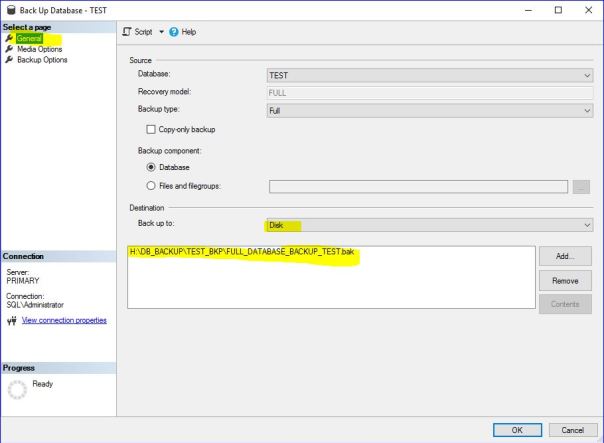
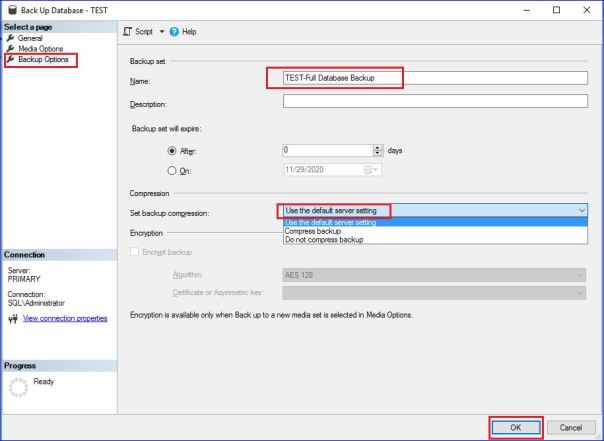
a) Using SSMS (GUI)
b) Using T-SQL

6. How to Take Differential Database Backup

a) Using SSMS (GUI)
b) Using T-SQL

7. How to Take Transaction Log Backup (T-LOG)

a) Using SSMS (GUI)
b) Using T-SQL

8. List Backup

9. Validate Backup – RESTORE VERIFYONLY

10. Check contents of backup – RESTORE HEADERONLY

___________________________________________________________________________________________________


1. How to Take Full Database Backup

This backs up the whole database. 
In order to have further differential or transaction log backups you have to create the full database backup first.

Syntax:

BACKUP DATABASE [DBNAME] TO DISK = N'H:\DB_BACKUP\FULL_DB_BACKUP_TEST.bak' WITH NAME = N'FULL DATABASE BACKUP - DBNAME',STATS 
GO


2. What is Differential Database Backup

Differential database backups are cumulative. This means that each differential database backup backs up the all the changes from the last Full database backup and NOT last Differential backup.

Syntax:

BACKUP DATABASE [DBNAME] TO DISK = N'H:\DB_BACKUP\FULL_DB_BACKUP_TEST.bak' WITH DIFFERENTIAL,NOINIT, NAME = N'DIFFERENTIAL BACKUP DBNAME DATABASE',STATS 
GO


3. What is Transaction Log Backup

It takes complete transaction log file 

Syntax:

BACKUP LOG [DBNAME] TO DISK = N'H:\DB_BACKUP\FULL_DB_BACKUP_TLOG.bak' WITH NAME= N'T-LOG BACKUP FOR DATABASE DBNAME',STATS 
GO


4. Verify Recovery Model for Database

SELECT name AS [Database Name],recovery_model_desc AS [Recovery Model] FROM sys.databases
GO


5. How to Take Full Database Backup

a) Using SSMS (GUI)


b) Using T-SQL

BACKUP DATABASE [TEST] TO DISK = N'H:\DB_BACKUP\TEST_BKP\FULL_DATABASE_BACKUP_TEST.bak' WITH NAME = N'FULL DATABASE BACKUP - TEST',STATS 
GO


6. How to Take Differential Database Backup

a) Using SSMS (GUI)


b) Using T-SQL

BACKUP DATABASE [TEST] TO DISK = N'H:\DB_BACKUP\TEST_BKP\FULL_DATABASE_BACKUP_TEST.bak' WITH DIFFERENTIAL,NOINIT, NAME = N'DIFFERENTIAL BACKUP TEST DATABASE',STATS 
GO


7. How to Take Transaction Log Backup (T-LOG)

a) Using SSMS (GUI)


b) Using T-SQL

BACKUP LOG [TEST] TO DISK = N'H:\DB_BACKUP\TEST_BKP\TEST_DB_BACKUP_TLOG.bak' WITH NAME= N'T-LOG BACKUP FOR DATABASE TEST',STATS 
GO


8. List Backup

-- List all database backups from last week.

SELECT 
CONVERT(CHAR(100), SERVERPROPERTY('Servername')) AS Server, 
msdb.dbo.backupset.database_name, 
msdb.dbo.backupset.backup_start_date, 
msdb.dbo.backupset.backup_finish_date, 
msdb.dbo.backupset.expiration_date, 
CASE msdb..backupset.type 
WHEN 'D' THEN 'Database' 
WHEN 'L' THEN 'Log' 
END AS backup_type, 
msdb.dbo.backupset.backup_size, 
msdb.dbo.backupmediafamily.logical_device_name, 
msdb.dbo.backupmediafamily.physical_device_name, 
msdb.dbo.backupset.name AS backupset_name, 
msdb.dbo.backupset.description 
FROM msdb.dbo.backupmediafamily 
INNER JOIN msdb.dbo.backupset ON msdb.dbo.backupmediafamily.media_set_id = msdb.dbo.backupset.media_set_id 
WHERE (CONVERT(datetime, msdb.dbo.backupset.backup_start_date, 102) >= GETDATE() - 7) 
ORDER BY 
msdb.dbo.backupset.database_name, 
msdb.dbo.backupset.backup_finish_date 


9. Validate Backup – RESTORE VERIFYONLY

RESTORE VERIFYONLY FROM DISK = 'H:\DB_BACKUP\TEST_BKP\FULL_DATABASE_BACKUP_TEST.bak'; 
RESTORE VERIFYONLY FROM DISK = 'H:\DB_BACKUP\TEST_BKP\TEST_DB_BACKUP_TLOG.bak'; 


10. Check contents of backup – RESTORE HEADERONLY

RESTORE HEADERONLY FROM DISK = 'H:\DB_BACKUP\TEST_BKP\FULL_DATABASE_BACKUP_TEST.bak'; 
RESTORE HEADERONLY FROM DISK = 'H:\DB_BACKUP\TEST_BKP\TEST_DB_BACKUP_TLOG.bak'; 

Caution: Your use of any information or materials on this website is entirely at your own risk. It is provided for educational purposes only. It has been tested internally, however, we do not guarantee that it will work for you. Ensure that you run it in your test environment before using.

Thank you,
Rajasekhar Amudala
Email: br8dba@gmail.com
Linkedin: https://www.linkedin.com/in/rajasekhar-amudala/


SQL Server – Recovery Models

MS SQL Server – Recovery models

Table of Contents
___________________________________________________________________________________________________

1. Types of Recovery Models

i) Simple recovery model            – Full and Differential backup
ii) Bulk-logged recovery model – Full, differential and log backup
iii) Full recovery model                 – Full, differential and log backup

2. Find recovery model
a) Using SSMS (GUI)
b) Using T-SQL

3. Change Recovery model
a) Using SSMS (GUI)
b) Using T-SQL

___________________________________________________________________________________________________


1. Types of Recovery Models

i) Simple recovery model

-- Simple recovery model every transaction will be logged into the transaction log file, but at regular intervals the transaction log file will be TRUNCATED whenever a CHECKPOINT operation occurs. 
-- Generally used in Development environment where Database Priority/Point-in-time priority is less
-- Not supported Transaction log backups
-- No Point-in-time recovery possible
-- Data loss chances are more


ii) Bulk-logged recovery model


-- In Bulk-logged recovery model every transaction will be logged into the transaction log file, but bulk insert operations are minimally logged.
-- Supports transaction log backups 
-- No automatic Truncate of Transaction log.
-- Chances of data loss if bulk insert operations fail
-- May or may not be possible to perform point-in-time recovery
-- Disk consumption will be high when normal transactions but in bulk Disk consumption will be low

iii) Full recovery model

-- In FULL recovery model every transaction will be logged into the transaction log file. 
-- This recovery model is generally used in Production databases
-- Supports transaction log backups 
-- No automatic Truncate of Transaction log.
-- Minimal/No Data Loss. 
-- Point-in-time Recovery
-- Performance Overhead and large transactions at times can take more time.
-- The downside of this model is that it can consume a lot of disk space very fast.
-- Make sure setup regular T-Log Backup, so that after T-Log backup it will truncate T-Log (space will be released)


2. Find recovery model

a) Using SSMS (GUI)

TEST (Database) -- Right Click --- Properties

b) Using T-SQL

USE master;
GO
select [name], DATABASEPROPERTYEX([name],'recovery') As RecoveryModel
from sysdatabases
where name  in ('master','model','tempdb','msdb','test')
GO


3. Change Recovery model

a) Using SSMS (GUI)


b) Using T-SQL

-- SET RECOVERY MODEL TO FULL
USE MASTER;
GO
ALTER DATABASE TEST SET RECOVERY FULL;
GO


-- SET RECOVERY MODEL TO SIMPLE
USE MASTER;
GO
ALTER DATABASE TEST SET RECOVERY SIMPLE;
GO


Caution: Your use of any information or materials on this website is entirely at your own risk. It is provided for educational purposes only. It has been tested internally, however, we do not guarantee that it will work for you. Ensure that you run it in your test environment before using.

Thank you,
Rajasekhar Amudala
Email: br8dba@gmail.com
Linkedin: https://www.linkedin.com/in/rajasekhar-amudala/

Authentication Method

Authentication Method

We recommend users to run their SQL Server with mixed authentication mode. To inspect the authentication mode of your SQL Server, follow screen shots below.

Caution: Your use of any information or materials on this website is entirely at your own risk. It is provided for educational purposes only. It has been tested internally, however, we do not guarantee that it will work for you. Ensure that you run it in your test environment before using.

Thank you,
Rajasekhar Amudala
Email: br8dba@gmail.com
WhatsApp : +
Linkedin: https://www.linkedin.com/in/rajasekhar-amudala/

Allow Remote Connection

Allow Remote Connection

Your need to make sure that remote connection to your SQL Server is enabled. To verify this setting follow the screen shots below.


Caution: Your use of any information or materials on this website is entirely at your own risk. It is provided for educational purposes only. It has been tested internally, however, we do not guarantee that it will work for you. Ensure that you run it in your test environment before using.

Thank you,
Rajasekhar Amudala
Email: br8dba@gmail.com
WhatsApp : +
Linkedin: https://www.linkedin.com/in/rajasekhar-amudala/

Enable TCP/IP Connection

Enable TCP/IP Connection

To check whether your server enabled to TCP/IP connections

Open SQL Server Configuration Manager and Follow screen shots.

Caution: Your use of any information or materials on this website is entirely at your own risk. It is provided for educational purposes only. It has been tested internally, however, we do not guarantee that it will work for you. Ensure that you run it in your test environment before using.

Thank you,
Rajasekhar Amudala
Email: br8dba@gmail.com
WhatsApp : +
Linkedin: https://www.linkedin.com/in/rajasekhar-amudala/

Install Only SQL Server Management Studio

How to Install Only SQL Server Management Studio 2014

Caution: Your use of any information or materials on this website is entirely at your own risk. It is provided for educational purposes only. It has been tested internally, however, we do not guarantee that it will work for you. Ensure that you run it in your test environment before using.

Thank you,
Rajasekhar Amudala
Email: br8dba@gmail.com
WhatsApp : +
Linkedin: https://www.linkedin.com/in/rajasekhar-amudala/

Install Microsoft SQL Server Express 2014

Steps to Install Microsoft SQL Server Express 2014

Before you start, it’s highly recommend to check hardware and software requirements for Installing SQL Server 2014

Caution: Your use of any information or materials on this website is entirely at your own risk. It is provided for educational purposes only. It has been tested internally, however, we do not guarantee that it will work for you. Ensure that you run it in your test environment before using.

Thank you,
Rajasekhar Amudala
Email: br8dba@gmail.com
WhatsApp : +
Linkedin: https://www.linkedin.com/in/rajasekhar-amudala/

Create Database using GUI

Create Database using the SQL Server Management Studio GUI

SQL Server Version: 2016

1. Click on SQL Server Management Studio GUI


2. Login


3. Create New Database

Ensure that the correct server is expanded in the Object Explorer.


Caution: Your use of any information or materials on this website is entirely at your own risk. It is provided for educational purposes only. It has been tested internally, however, we do not guarantee that it will work for you. Ensure that you run it in your test environment before using.

Thank you,
Rajasekhar Amudala
Email: br8dba@gmail.com